
You can download the application from the Downloads section.
Once downloaded, install it on your computer.
The application updates itself automatically whenever a new version is available.
The software is signed with a strong EV certificate and the publisher is 2DSCANNER LP.
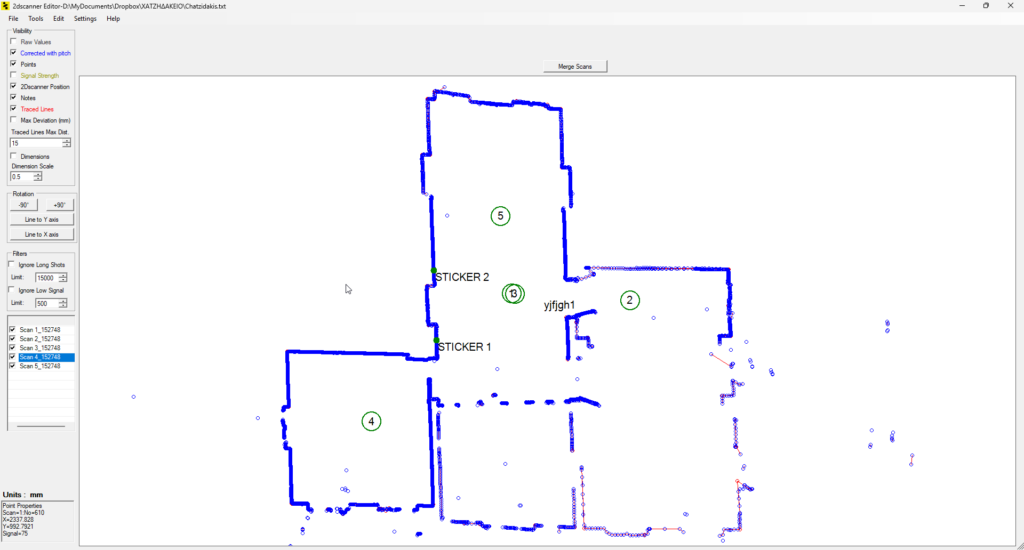
The 2Dscanner Editor is a powerful yet lightweight application for Windows and macOS, included in the price of the 2Dscanner, with no subscription.
This editor installs on your computer and allows you to process scans at a later time. This enables you to perform a series of operations, some of which are already implemented within the app during the survey phase.
If the result from the smartphone app is not satisfactory or if you want to perform further post-processing operations, this is the ideal tool.
What you can do with 2Dscanner Editor:
1) Open TXT files generated by 2Dscanner
2) Verify the signal quality of each point
3) Filter data by eliminating points with poor signals or points too far from the survey area
4) Delete points considered erroneous or accidentally captured on objects not part of the survey
5) Trace lines that interpolate the points (and do not simply connect them as other similar tools do) and automatically construct the corresponding angular connections
6) Check the maximum deviation of points from these lines
7) Move and rotate scans as desired
8) Merge different scans by aligning them and inserting wall thicknesses
9) Automatically create linear and angular dimensions
10) Export DXF
It is available in 6 languages: English, French, Italian, German, Spanish and Greek.
Each step can be undone and redone using the Undo and Redo commands.
All buttons and menus have tooltips. Hover over a control to see its description.
Explore functionality of the software from the links below.


