• PRO
  • EDITOR
  • DEVICE
  • Contact Us
  • English
    • Français
    • Deutsch
    • Ελληνικά
    • Italiano
  • PRO
  • EDITOR
  • DEVICE
  • Contact Us
  • English
    • Français
    • Deutsch
    • Ελληνικά
    • Italiano
  • 2dscanner Pro App
  • Installation-Permissions
  • Enable automatic updates
  • Languages
  • Connect 2dscanner
    • Auto Scan
      • Full 360 Scan
      • Partial Auto Scan
      • Settings
    • Combo Scan
      • Tools
      • Smart Scan
      • Settings
        • Trace Lines Algorithm
        • Auto Dimensions
      • Real Time Drawing window
      • Combination of scans
        • Adding Stickers
        • 1 Sticker
        • 2 stickers
        • 1 Corner
        • 2 Corners
        • New Scan from Same Spot
      • File Save screen
    • Photos
    • File Manager
    • View drawingLevel
    • Tools
      • Firmware Upload for Android
      • Firmware Upload for iOS users
      • Spirit level calibration
    • Spirit Level
    • Surveying Tips

    Combination of scans

    511 views 0

    Combining scans from different positions is possible and available in Combo Scan.

    After you finish with your scan tap Next Scan.

    Next Scan

    A new screen appears and prompts you to choose the type of connection with the old scan. You have to follow the instructions carefully.
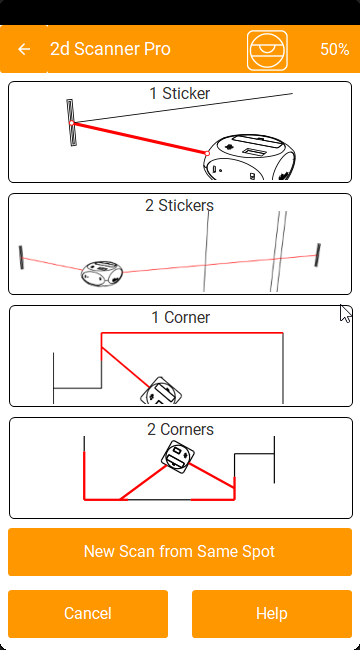
    You can use one of the available methods to join the next scan.

    1 Sticker

    2 Stickers

    1 Corner

    2 Corners

    New Scan frome Same Spot

    Related Articles
    • Tools
    • Enable automatic updates
    • Photos
    • Spirit level calibration
    • Firmware Upload for iOS users
    • Firmware Upload for Android

    Didn't find your answer? Contact Us

    Previously
    Real Time Drawing window
    Up Next
    Adding Stickers
    Copyright 2024 2D SCANNER. All Rights Reserved
    • English
    • Français (French)
    • Deutsch (German)
    • Ελληνικά (Greek)
    • Italiano (Italian)